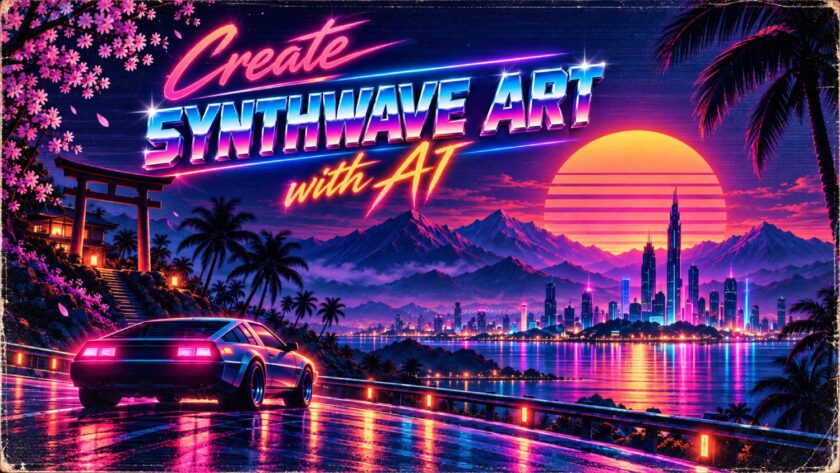
A glowing sun sinking behind neon mountains. A perfect grid stretching to the horizon. Chrome lettering, palm-tree silhouettes and a sky fading from hot pink to deep purple. That is synthwave, one of the most recognizable retro aesthetics online.
Until recently, creating synthwave art meant hours in design software. Now, AI image generators can produce striking synthwave wallpapers, album covers and social graphics from a single well-written prompt.
This beginner’s guide explains what synthwave is, breaks down the visual elements that define it, shows you how to structure prompts that get consistent results, and gives you ready-to-use prompts for wallpapers and album art.
Key Takeaways / TL;DR
★ AI can recreate classic synthwave visuals using detailed prompts and clear style directions.
★ Focus on neon colours, retro grids, glowing sunsets, futuristic cities, sports cars, and 1980s-inspired imagery.
★ Specify lighting, composition, colour palette, atmosphere, and aspect ratio for more consistent results.
★ Start with simple prompts, then refine individual details rather than changing everything at once.
★ Strong synthwave art balances retro nostalgia with futuristic visual elements.
What Is Synthwave?
Synthwave began as a music genre in the late 2000s, inspired by 1980s film soundtracks, synthesizer pop and video game music. As the music grew, so did a matching visual style.
Synthwave art is not a precise recreation of the 1980s. It is a romanticized, idealized version of how the decade imagined the future: neon cities, digital landscapes, fast cars and endless sunsets. Think of it as “the future, as seen from 1985.”
You will also hear related terms:
- Outrun: A style focused on sports cars, open roads and sunsets, closely tied to synthwave.
- Retrowave: Often used interchangeably with synthwave.
- Vaporwave: A related but different aesthetic, typically softer and more surreal, with pastel tones, classical statues and early computer graphics.
This guide focuses on the classic synthwave look, which is the most popular for wallpapers, album art and branding.
The Core Elements of the Synthwave Look
Most synthwave images combine a handful of recurring elements. Naming them in your prompts gives the AI a clear visual vocabulary.
- The neon grid: A glowing wireframe floor stretching toward the horizon, usually in magenta or cyan.
- The striped sun: A large setting sun with horizontal bands cut through its lower half, glowing in yellow, orange and pink.
- Wireframe mountains: Triangular peaks drawn in glowing outlines, often purple or blue.
- Chrome text: Shiny, metallic lettering with reflections, sometimes paired with a neon script font.
- Palm trees: Dark silhouettes framing the scene.
- Retro vehicles: Sleek sports cars, often seen from behind, driving toward the sun.
- Night cityscapes: Skylines glowing with neon signs and reflections on wet streets.
- Texture: Scan lines, light grain, glow and a subtle VHS softness.
A starter synthwave color palette
Using a consistent palette is one of the fastest ways to make AI images look polished. Here is a simple starting point you can reference in prompts or design software.
| Role | Color | Hex code |
|---|---|---|
| Background sky | Deep midnight purple | #1A0B2E |
| Primary neon | Hot magenta | #FF2E97 |
| Secondary neon | Electric cyan | #00E5FF |
| Sun gradient top | Warm yellow | #FFD319 |
| Sun gradient bottom | Sunset orange | #FF6B35 |
| Accent | Soft violet | #9D4EDD |
AI models do not always match exact hex codes, but naming colors this specifically usually keeps results close.
How to Write a Synthwave Prompt
Strong synthwave prompts follow a simple five-part structure.
- Format and purpose: Say what you are making and its shape, such as “a 16:9 desktop wallpaper” or “a square album cover.”
- Main subject: Choose the focal point, such as a striped sun, a sports car, a city skyline or a lone figure.
- Setting and elements: Add the grid, mountains, palm trees, ocean or clouds.
- Color and lighting: Name your palette and light sources, such as magenta and cyan neon with a glowing sunset.
- Style and finish: Specify the rendering style and texture, such as “clean digital illustration, soft glow, subtle scan lines.”
Formula: format + subject + setting + colors + style.
Step-by-step method
- Pick a tool. Most image generators, including ChatGPT, Gemini, Midjourney and Adobe Firefly, can produce synthwave art. Features and limits vary, so check what your plan offers.
- Start simple. Begin with a basic prompt, then add detail once you see what the tool produces.
- Set the aspect ratio. Ask for 16:9 for desktop, 9:16 for phones and 1:1 for album covers.
- Refine one detail at a time. Try “make the grid brighter” or “add more stars to the sky.”
- Add text separately if needed. AI text can be unreliable, so consider adding titles in a design tool afterward.
- Upscale and export. Download the highest resolution available, especially for wallpapers and print.
Synthwave Wallpaper Prompts
Copy these prompts as they are, or swap in your own colors and details.
1. Classic sunset grid (desktop)
Create a 16:9 synthwave desktop wallpaper. A huge striped sun glows in yellow and orange as it sets behind purple wireframe mountains. A glowing magenta neon grid stretches across the ground to the horizon. Deep purple sky with scattered stars. Clean digital illustration, soft glow, subtle scan lines, no text.
2. Neon coastline (desktop)
Create a 16:9 synthwave wallpaper of a calm ocean at dusk. A large pink and orange striped sun sits on the horizon, reflected in rippling water. Black palm-tree silhouettes frame both sides. Gradient sky from violet to hot pink. Smooth retro-futuristic illustration with gentle glow, no text.
3. Night drive (desktop)
Create a 16:9 outrun-style wallpaper. A sleek, generic 1980s-style sports car seen from behind drives along an empty highway toward a glowing striped sun. Neon cyan road lines, magenta grid hills on both sides, and a starry purple sky. Cinematic digital art with motion blur and light grain. No real car brands or logos, no text.
4. Neon city skyline (desktop)
Create a 16:9 synthwave city skyline at night. Tall futuristic towers outlined in glowing cyan and magenta, with neon signs in abstract shapes, reflected on a wet street. A purple haze fills the sky, with a faint striped sun behind the buildings. Detailed digital illustration with glow and soft scan lines, no readable text.
5. Minimal sun (phone)
Create a 9:16 minimalist synthwave phone wallpaper. A single large striped sun in a yellow-to-pink gradient is centered in a deep navy sky above a simple magenta grid. Clean, flat design with plenty of empty space at the top for clock and notifications. No text.
6. Lone palm (phone)
Create a 9:16 synthwave phone wallpaper. One tall palm-tree silhouette stands in front of a glowing striped sun, with a cyan grid below and a gradient sky from purple to pink. Soft glow, subtle grain, centered composition, no text.
7. Retro arcade landscape (desktop)
Create a 16:9 wallpaper that blends synthwave and 8-bit game art. A pixelated striped sun, blocky neon mountains and a glowing grid floor, all rendered in a crisp retro pixel-art style with a magenta and cyan palette. No text, no existing game characters.
Synthwave Album Art and Cover Prompts
Album covers are usually square and need a strong focal point that still works as a small thumbnail on streaming platforms. Replace the bracketed titles with your own.
1. Chrome title cover
Create a square 1:1 synthwave album cover. In the center, large shiny chrome 3D lettering reads “[ALBUM TITLE]” with pink and blue reflections. Behind it, a striped sunset sun and a glowing magenta grid fade into a starry purple sky. Bold, high-contrast digital art with soft glow.
2. Retro-futuristic portrait
Create a square synthwave album cover featuring a stylized, original character wearing reflective visor sunglasses that mirror a neon sunset and grid. Magenta and cyan rim lighting against a dark purple background. Airbrushed 1980s-inspired illustration style. No text.
3. Cassette in space
Create a square album cover showing a glowing cassette tape floating in space above a neon grid planet, with a striped sun on the horizon and trails of pink light. Dreamy synthwave style, soft glow and light grain. Leave the top third clear for a title.
4. Midnight highway single
Create a square single cover of a lonely highway at night stretching toward a giant striped sun. Neon cyan road markings, purple mountains and a faint city glow on the horizon. Moody, cinematic synthwave illustration. Small neon script text at the bottom reads “[SONG TITLE].”
5. Darksynth cover
Create a square darksynth album cover. A sinister red and black version of the synthwave look: a blood-red striped sun, jagged black mountains, a glowing red grid and heavy shadows. Gritty texture and strong contrast. No text.
6. Dreamy chillwave cover
Create a square chillwave album cover in soft pastel tones of lavender, peach and teal. A gentle striped sun sets over calm water with palm silhouettes and a faint grid reflection. Hazy, relaxed mood with soft film grain. No text.
For album art you plan to release, check the AI tool’s terms of use, and confirm whether your distributor has rules about AI-generated artwork.
Fixing Common Synthwave Problems
- The image looks muddy or dull: Ask for “high contrast, vivid neon glow and a darker background” so bright colors stand out.
- The grid is warped or uneven: Request “a perfectly straight, symmetrical perspective grid” and simplify the rest of the scene.
- The sun has no stripes: Describe it precisely: “a large sun with five horizontal gaps cut through its lower half.”
- Text is misspelled: Keep titles short, put them in quotes, or generate the image without text and add lettering in a design tool.
- It looks too modern: Add “1980s retro-futuristic style, airbrushed look, scan lines and light VHS grain.”
- Wallpapers have awkward crops: Ask for “important elements centered, with empty space at the top” for phone screens.
Using Synthwave Art Responsibly
- Avoid real brands and logos. Describe cars, gadgets and signs generically rather than naming real companies.
- Do not copy existing artwork. Avoid asking the AI to recreate a specific artist’s work, album cover or film poster.
- Credit and disclose where appropriate. If you publish AI art commercially or for a client, be transparent about how it was made.
- Check usage rights. Review the terms of the AI tool you use, especially before selling prints or merchandise.
Frequently Asked Questions
What is synthwave art?
Synthwave art is a retro-futuristic visual style inspired by 1980s pop culture. It typically features neon grids, striped sunsets, wireframe mountains, chrome text, palm trees and a magenta, cyan and purple color palette.
Which AI tool is best for synthwave art?
Most popular image generators, including ChatGPT, Gemini, Midjourney and Adobe Firefly, can create synthwave images. Results vary, so test the same prompt in more than one tool to see which style you prefer.
What colors are used in synthwave?
The classic palette includes deep purple or navy backgrounds, hot magenta and electric cyan neon, and a yellow-to-orange or pink gradient for the sun.
What is the difference between synthwave and vaporwave?
Synthwave focuses on bold neon, sunsets, grids and retro-futuristic scenes. Vaporwave is usually softer and more surreal, with pastel colors, classical statues and early computer graphics.
Can I use AI synthwave art for my album cover?
Often, yes, but check the AI tool’s terms of use and any rules from your music distributor about AI-generated artwork. Avoid copying existing covers, logos or artists’ styles too closely.
Final Thoughts: Your Neon Future Starts Here
Synthwave is one of the easiest retro styles to create with AI because its visual language is so clear: grids, sunsets, mountains, chrome and neon. Name those elements, choose a consistent palette, and refine one detail at a time, and you can produce wallpapers and album art that look professionally designed.
Once you master the basics, experiment with variations like darksynth, chillwave and pixel art to develop a style that is uniquely yours.
For musicians, creators and brands, eye-catching artwork is only half the job. People also need to find your work. At Megrisoft, we help creators and businesses grow their visibility through SEO, content strategy and AI search optimization. If you want your music, art or brand to reach a bigger audience, get in touch with our team.